
User's Manual




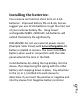
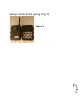


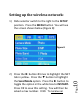
Table Of Contents
- Camera Button Control Diagram:
- Understanding main screen info:
- /
- Installing the batteries:
- Setting the camera mode:
- Camera mode settings:
- Video mode settings: (Figure 20).
- SYS tab:
- Viewing photos on the color display:
- Troubleshooting:
- Tricks and tips on field setup:
- Covert Scouting Cameras Warranty:
- Covert Warranty Policy and Procedure:
- Covert International Warranty Policy and Procedure:
- /Set Up on a MAC:

Page10
Setting up the wireless network:
1) Slide selector switch to the right to the SETUP
position. Press the MENU button You will see
the screen shown below (Figure 8):
2) Press the ► button 2 times to highlight the NET
tab in yellow. Press the ▼ button to highlight
the Send Mode option. Press the ► button to
toggle the option in the white box to INSTANT.
Press OK to save this setting. You will then be
asked a max number. 0-99. To
receive an
Figure 8