
Data Sheet


Easy to use
Veracity’s PINPOINT adaptor allows IP
video installers to easily set up and focus
Power over Ethernet (POE) enabled
IP cameras.
No temporary local power source for
the camera is required, as PINPOINT
enables the camera to draw its power
from the installed POE network cabling,
whilst re-directing the actual Ethernet
network connection to a local laptop,
netbook or even PDA.
The IP camera image and set-up
parameters can be viewed on a browser
(or specific camera software) running
on the local computer device. With
the camera image in close proximity
to the camera itself, it allows precise
adjustment of all of the variables with
immediate feedback via the actual
camera image. This means that the lens
field of view, focus and camera viewing
angle/direction can be very rapidly
optimised and locked in position.
Connects in seconds
A flying lead connection to the camera
and a clear connection diagram means
PINPOINT insertion can be done in
seconds. PINPOINT features integrated
network crossover, so a standard network
cable can be used to link the laptop
or netbook. A “POE Enabled” LED provides
visual confirmation that the camera is
receiving power. Veracity’s PINPOINT
is compatible with standard POE, and
also most POE Plus and non-standard
POE up to 30 watts.
PINPOINT is so compact
- it fits in your pocket
PINPOINT is very compact in size and
is of a tough moulded construction,
ideal for stowing in a toolbox, pocket or
engineer’s laptop bag.
PINPOINT is designed for temporary
installation during setup of IP cameras.
Whilst PINPOINT is in place, the camera
network connection is redirected to the
local network port, and there will be no
network connection to the main network.
Connection to the main network is
restored immediately when setup is
complete and PINPOINT is extracted.
PINPOINT is an essential part of any
IP camera installer’s toolkit
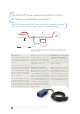
PINPOINT passes through POE to the camera, but re-directs the network
to a local RJ45 port for local image display on a netbook or laptop.
Diagram 1. PINPOINT is inserted between the POE network and the IP camera,
diverting the IP camera network connection to the local PINPOINT RJ45 port for
a laptop connection.
IMAGINATION INNOVATION INTEGRATION
IP CAMERA
POWER
POE NETWORK
SWITCH
LAPTOP
POE
ETHERNET WITH POE ETHERNET DATA ONLY
NETWORK DATA
POE
VOR-ORM
D ATA