
Use and Care Manual

- 8 -
Introduction
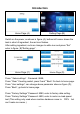
Home Page (A)
Setting Page (B)
Switch on the power, as shown in figure (A), bottom-left corner shows the
tank is short of ingredient, the red icon flashes.
After adding ingredient, red icon changes to white icon.and press “Set”
enter to figure ( B)“Setting page” .
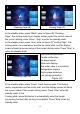
Home Page (C)
Home Page (D)
Press “ Sales settings” : Password: 8888;
Press “Clear” Counting restart, press “back” “Back” Go back to home page.
Press “User settings”: can change above parameter show as figure (D);
Press “Back”, go back to home page.
Press “Factory Settings” Password: 8080, enter to factory data setting.
Press “Factory Settings” Password: 6800, enter to motor no-load speed
test (This setting only used when machine hardness come to 100% but
can’t make ice cream.)