
Installation


2019-08-15 12:22 7/39 Color Control GX manual
Victron Energy - https://www.victronenergy.com/live/
Alternatively the VE.Bus to VE.Can interface (ASS030520105) can be used. Add one for each
additional system. Note that we advise against it; this interface is a deprecated product. Make sure
that the VE.Can network is terminated and powered. For powering the VE.Can network, see Q17 in our
data communication whitepaper.
1.4.2 Battery Monitor BMV-700 series; and MPPTs with a VE.Direct port
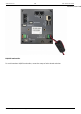
Either one or two compatible products can be connected directly on the back of the CCGX using a
standard VE.Direct cable. There are two types of VE.Direct cable available:
Straight VE.Direct cables, ASS030530xxx1.
VE.Direct cables with an angled connector on one end. These are designed to minimize the2.
required depth behind a panel, ASS030531xxx
VE.Direct cables have a maximum length of 10 metres. It is not possible to extend them. If longer
lengths are required, use the VE.Direct to VE.Can interface. Note that this only works for BMV700 and
BMV702. Not for the BMV712, MPPT solar chargers and Inverters with a VE.Direct port. See next
paragraph for more information on that VE.Can interface.
Connecting more than two devices to your CCGX using VE.Direct
First of all, note that the maximum of VE.Direct devices that can be connected is 5 for the CCGX. How
they are connected, so direct, via USB or via CAN, does not change the maximum. See here for the
Venus GX, Octo GX, and other limits.
Option 1: Use the VE.Direct to USB interface. The CCGX has two USB ports. Use a USB-hub when
more than two USB ports are required.
Option 2: The BMV700 and BMV702 can also be connected using the VE.Direct to VE.Can
interface. Note that the BMV712, MPPTs and VEDirect Inverters cannot be connected using this
canbus interface as it does not translate the data into canbus messages. When using the
VE.Direct to VE.Can interface, make sure that the VE.Can network is terminated, and also
powered. For powering the VE.Can network, see Q17 in our data communication whitepaper.
Notes about older VE.Direct MPPTs
The MPPTs need to run firmware version v1.09 or later. See the Victron Professional website
https://professional.victronenergy.com/ to obtain files and for update instructions.
An MPPT 70/15 needs to be from year/week 1308 or later. Earlier 70/15s are not compatible
with the CCGX, and unfortunately upgrading the MPPT firmware will not help. To find the
year/week number of your model, look for the serial number which is printed on a label on its
back. For example number HQ1309DER4F means 2013, week 09.
1.4.3 Skylla-i, Lynx Shunt VE.Can, Lynx Ion + Shunt and MPPTs with a VE.Can port
To connect a product with a VE.Can port, use a standard RJ45 UTP cable. (Available with straight and
elbow connectors)
Don't forget to terminate the VE.Can network at both ends using a VE.Can terminator. A bag with two
terminators is supplied with each VE.Can product. They are also available separately.