
Instruction manual
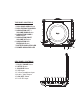
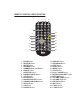


To play or view content from the USB flash drive simply use the Navigation
buttons (3, 4, 5, & 6) on the DVD player, or on the Remote (8, 11, 12, 23) to
highlight the desired file and press either the PLAY / PAUSE button (9) on the
DVD player, or the ENTER button (10) on the Remote to begin playing the file.
When you have finished using the USB playback mode, simply remove the USB
flash drive and the player will automatically return to the DVD playback mode.
TROUBLESHOOTING
PROBLEM
SOLUTION
Disc will not play
• Make sure the disc is loaded
correctly with the label side
facing up
• Make sure the disc is not dirty,
cracked, or scratched
• Try another disc
DVD battery will not charge
• Make sure the AC or Car / Boat
adapter is securely connected to
the 9-12V DC Input (16)
• Try another outlet
DVD player shut off during playback
• Charge the battery or connect
the power adapter to an electrical
outlet
No sound from the speakers
• Make sure the volume is not set
too low or on Mute
• Make sure nothing is inserted
into the 3.5mm Headphone
Input (13)
No picture when connected to a TV
• Make sure the correct TV
SYSTEM is chosen in the
SETUP MENU (see page 7)
Remote does not work
• Make sure there is nothing
blocking the remote sensor on
the front of the DVD player
• Try moving closer to the DVD
player
• Replace the battery in the remote