
Instruction manual


VOLUME using the buttons on either the DVD Player or the Remote
• To Increase the Volume:
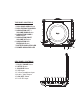
o Using the DVD Player: Press the NAVIGATION RIGHT /
VOLUME UP button (5)
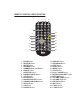
o Using the Remote: Press the VOLUME UP button (26)
• To Decrease the Volume:
o Using the DVD Player: Press the NAVIGATION LEFT / VOLUME
DOWN button (3)
o Using the Remote: Press the VOLUME DOWN button (25)
SKIPPING TO THE NEXT OR PREVIOUS SCENE/TRACK
• To Skip Forward to the next Scene/Track on a disc:
o On the DVD Player: Press the NAVIGATION DOWN / NEXT
button (4)
o On the Remote: Press the NEXT button (28)
• To Skip Backward to the previous Scene/Track on a disc:
o On the DVD Player: Press the NAVIGATION UP / PREVIOUS
button (6)
o On the Remote: Press the PREVIOUS button (27)
FAST FORWARD OR FAST REVERSE
NOTE: the Fast Forward or Fast Reverse functions can only be adjusted using the
Remote Control.
• To use Fast Forward:
o Press the F.FWD button (30) to scan the disc forward at x2, x4,
x8, and x20 normal speed.
! Press the PLAY / PAUSE button (22) to resume normal
playback.
• To use Fast Reverse:
o Press the F.REV button (29) to scan the disc backward at x2, x4,
x8, and x20 normal speed.
! Press the PLAY / PAUSE button (22) to resume normal
playback.
USING THE NAVIGATION BUTTONS
When navigating the Menu screen of your DVD, or the SETUP Menu of the DVD
player, use the Navigation buttons (3, 4, 5, & 6) on the DVD player, or on the
Remote (8, 11, 12, 23) to highlight your desired selection on the screen.