
Operating instructions

102
Weather-compensated control unit Constant temperature control unit
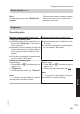
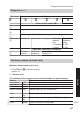
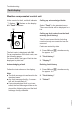
Resetting operating data
Saved operating data (e.g. hours run) can
be reset to "0".
The value "Adjusted outside temp" is re-
set to the actual value.
Saved operating data (e.g. hours run) can
be reset to "0".
Service menu:
1. Press OK and å simultaneously for
approx. 4 s.
2. "Diagnosis"
3. "Reset data"
4. Select required value (e.g. "Burner
starts") or "All details".
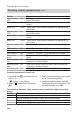
Service menu:
1. Press OK and å simultaneously for
approx. 4 s.
2. Select required information with / .
3. Confirm with OK; " " flashes.
4. Confirm with OK; the value is reset.
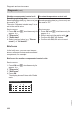
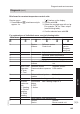
Brief scan
In the brief scan, you can scan temper-
atures, software versions and connected
components, for example.
Brief scan for weather-compensated control units
Service menu:
1. Press OK and å simultaneously for
approx. 4 s.
2. "Diagnosis"
3. "Brief scan".
4. Press OK.
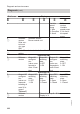
The display shows 9 lines with 6 fields
each.
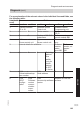
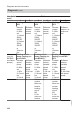
Diagnosis brief scan
2:
1:
3:
4:
Select with
Ø
0
0
0
1 F
0
0
0 0
0
0
0 A
0
0
0 0
0
0
1 2
0
0
0
Diagnosis and service scans
Diagnosis
(cont.)
5772 909 GB