
Operating instructions

105
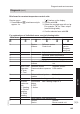
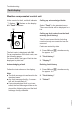
Brief scan for constant temperature control units
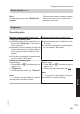
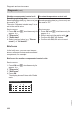
Service menu:
1. Press OK and å simultaneously for
approx. 4 s.
"Ü" flashes on the display.
2. Confirm with OK.
3. Select the required scan with V/v.
For example, "A" for "Max. output"
(see following table):
4. Confirm selected scan with OK.
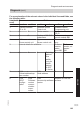
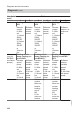
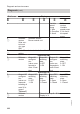
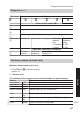
For explanations of individual scans, see the following table:
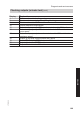
Brief scan Display
0 System
scheme
Software version
Control unit
Software
version
Program-
ming unit
1 Adjusted outside temperature
3 Set boiler water temperature
4 Common demand temperature
5 Set cylinder temperature
6 Number of KM BUS sub-
scribers
Number of LON subscrib-
ers
7 SNVT con-
figuration
0: Auto
1: Tool
Software version
Communication coproces-
sor
Software version
LON module
8 Subnet address/system
number
Node address
9 Burner control unit type Device type
A Diverter
valve sta-
tus
1: Heating
2: Central
position
3: DHW
heating
Flow switch
status
0: OFF
1: Active
Max. heating output in %
b Boiler coding card (hexadecimal)
C Version
Device
Version
Burner control unit
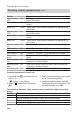
Diagnosis and service scans
Diagnosis
(cont.)
5772 909 GB
Service