
Operating instructions


59
Calling up and resetting the service display
The red fault indicator flashes when the
limits set in coding addresses "21" and
"23" have been reached. (Coding
address in group "Boiler" (weather-
compensated control unit) or group 2
(constant temperature control unit).)
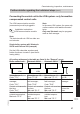
Weather-compensated control unit Constant temperature control unit
Display
"Service" and "¸" The specified hours run or the specified
interval with calendar symbol "
ý
" (sub-
ject to setting) and "
¸
"
Acknowledging a service
Press OK.
Service the appliance.
Note
An acknowledged service message that
was not reset appears again the following
Monday.
Press OK.
Service the appliance.
Note
An acknowledged service message that
was not reset appears again after
7 days.
After the service has been carried out: Reset the codes
Service menu:
1. Press OK and å simultaneously for
approx. 4 s.
2. "Service functions"
3. "Service reset"
Note
The selected service parameters for
hours run and interval restart at "0".
Reset code "24:1" in group 2 to "24:0".
Note
The selected service parameters for
hours run and interval restart at "0".
Instructing the system user
The system installer should hand the
operating instructions to the system user
and instruct the user in operating the
system.
This includes all components installed as
accessories, e.g. remote control units. In
addition, the system installer must make
the user aware of the required mainte-
nance work.
Commissioning, inspection, maintenance
Further details regarding the individual steps
(cont.)
5772 909 GB
Service