
Technical data
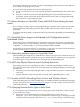




be allowed to deliver time (allow guests to be a time consumers). Because a VM guest never
delivers time, you do not need to configure the local clock (server 127.127.1.0) or an ntp.drift
file. So, the ntp.conf file on a VM guest should be as simple as the single line:
server <VM-HOST-SERVER-NAME> minpoll 4 maxpoll 6
After configuring the guest's /etc/ntp.conf file, assuming NTP is already enabled (that is,
the XNTPD variable in /etc/rc.config.d/netdaemons is set to 1, as in export XNTPD=1),
you can run the following commands on an HP-UX guest to sync its time with the VM Host and
restart xntpd:
/sbin/init.d/xntpd stop
/usr/sbin/ntpdate -b <VM-HOST-SERVER-NAME>
/sbin/init.d/xntpd start
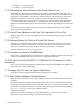
NOTE: For VM guests that are on a different subnet than the VM Host, the VM Host may not
be the best source of time if there is another accurate time server available with less network
latency. In the case of different subnets, measure latency from the guest to various time servers
using the ping and traceroute commands to determine which potential time server has the
least network latency. Using the VM Host may be the best solution, but this depends on your
local network topology and the relative network distance to alternate time servers. If using an
alternate (non-VM-Host) time server appears best, it may be helpful for the alternate time server
and the VM Host to use each other for peer mutual time synchronization.
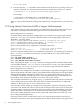
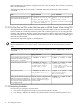
7.2.10 Supported Adapters
Integrity VM supports those adapters that are of Ethernet or the IEEE 802.3 CSMA/CD network.
Note that AVIO interfaces are supported by a select set of Ethernet host NICs. The following
Ethernet cards are supported with AVIO on HP-UX guests:
• A6794A — Core
• A6825A — Core
• A7109A — Core
• A6847A — Add-in
• AB465A — Combo Add-in
• A9782A — Combo Add-in
• A9784A — Combo Add-in
• AB352 — Core
• AB545A — Networking Add-in
• A7011A — Networking Add-in
• A7012A — Networking Add-in
• AB290A — Combo Add-in
• AB287A — Add-in (10GbE)
• AD331A — Add-in
• AD332A — Add-in
• AD193A — Combo Add-in
• AD194A — Combo Add-in
• AD221A — Add-in
• AD222A — Add-in
• AD337A — Add-in
• AD338A — Add-in
• AD339A — Add-in
• AD385A — Add-in (10GbE)
• AD386A — Add-in (10GbE)
7.2 Known Issues and Information 73