
Technical data
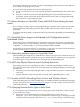




You can set the HPVMMACADDRFRAMES tunable to zero (0), which completely eliminates the MAC
address verification. However, HP recommends that you do so after you configure all of your
guests and confirm that there are no conflicts with MAC addresses in your network environment.
To boost virtual network performance, create additional vswitches and allocate them across
guests.
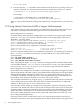
7.2.18 Auto Port Aggregation (APA) is Supported on the VM Host, Not on the Guest
Integrity VM does not support running APA on a guest. You can run APA on the VM Host.
APA can be configured on the VM Host to provide a highly available LAN for the vswitch (APA
in active/passive mode) or to increase the bandwidth of the vswitch LAN (APA active/active
mode). Before you stop APA, use the hpvmnet -h command to halt the vswitch. If you do not
halt the vswitch first, the hpvmnet command reports an incorrect MAC address for the vswitch.
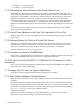
7.2.19 Do Not Run Applications that Set Network Devices into Promiscuous Mode
Vswitches must not be connected to network devices that are set to promiscuous mode. Do not
run applications like tcpdump on the VM Host on interfaces that are used for virtual switches.
7.2.20 Guest and Host Communication
Checksum offloading (CKO) is not supported. On most of the physical interfaces that are not of
10 Gigabyte type, CKO is turned off by default. Consult your interface card documentation for
details.
Turning on CKO can cause host-to-guest connections as well as guest-to-host communication
over a VLAN to fail. If you are receiving failures with host-to-guest connections or guest-to-host
communication using a VLAN, ensure that the CKO is turned off in the host interface driver. If
that does not fix the problem, reboot the vswitch.
To turn off the CKO on the VM Host, identify the PPA of the network interface for the vswitch
using the hpvmnet command. For example:
# hpvmnet
Name Number State Mode PPA MAC Address IP Address
======== ====== ======= ========= ====== ============== ===============
localnet 21 Up Shared N/A N/A
vmlan0 22 Up Shared lan0 0x00306ea72c0d 15.13.114.205
vmlan4 23 Up Shared lan4 0x00127942fce3 192.1.2.205
vmlan900 24 Up Shared lan900 0x00306e39815a 192.1.4.205
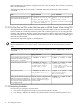
NOTE: The lanadmin command is deprecated and will be removed in a future HP-UX release.
HP recommends that you use the nwmgr command to perform all network interface-related
tasks.
The following table shows the nwmgr command that performs the same task as the lanadmin
command:
nwmgr Command
Legacy CommandTask
# nwmgr -g -A all -c lan4 |
grep Checksum
Transmit Checksum Offload=Off
Receive Checksum Offload=On
# lanadmin -x cko 4
Hardware TCP/UDP (IPv4)
transmit checksum offload
is currently enabled.
Hardware TCP/UDP (IPv4)
receive checksum offload is
currently disabled.
Check the status of the transmit CKO.
7.2 Known Issues and Information 75