
Technical data




In this example, the VLANs are configured over the vswitch vmlan4. This vswitch is created on
PPA 4 on the VM Host.
The following table shows the nwmgr command that performs the task as the lanadmin
command:
nwmgr Command
Legacy CommandTask
# nwmgr -s -A tx_cko=off -c
4
lan2 current values:
Transmit Checksum Offload=Off
# lanadmin -X send_cko_off
4
Hardware TCP/UDP (IPv4)
transmit checksum offload
is currently disabled.
Turn off CKO on PPA 4 by entering
this command on the VM Host.
7.2.21 Do Not Turn on TSO on the VM Host and on HP-UX Guests When Using VIO
TCP Segmentation Offload (TSO) is turned off by default in HP-UX. HP recommends that you
leave it turned off on both the VM Host system and on HP-UX guests if you are using the VIO
interface. This applies to both the virtual network interface cards in the guest and any physical
network interface cards in the VM Host that are used by vswitches. When TSO is enabled, guest
networks are interrupted.
Note that this restriction applies to VIO interfaces.
NOTE: The lanadmin command is deprecated and will be removed in a future HP-UX release.
HP recommends that you use the nwmgr command to perform all network interface-related
tasks.
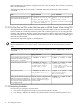
The following table shows the comparable nwmgr command to use to replace the lanadmin
command:
nwmgr CommandLegacy CommandTask
# nwmgr -g -A vmtu -c lann# lanadmin -x vmtu n
Verify whether TSO is turned on. n
is the VM Host interface, as displayed
by the hpvmnet command.
# nwmgr -g -A vmtu -c lan0
lan0 current values:
Virtual MTU = 32160
TCP Segmentation Offload
is now disabled.
# lanadmin -x vmtu 0
Driver/Hardware supports TCP
Segmentation Offload,
Current VMTU = 32160
Verify that TSO is on for lan0.
# nwmgr -s -A vmtu=0 -c lan0
lano current values:
New Virtual MTU=0
# lanadmin -X vmtu 0 0
Virtual MTU is set to 0
Turn TSO off on lan0.
# nwmgr -s -c lan0 -A all
--sa -fr cu
Manually edit the configuration file
in /etc/rc.config.d, or use SAM
interface. See the Ethernet Support
Guide for details.
Allow the TSO attribute change along
with the rest of the lan attributes to
be perserved between system reboots
by saving the current attributes to the
lan configuration file.
7.2.22 Restarting Vswitches
It is necessary to restart the vswitch when:
• You replace the physical network card associated with the vswitch.
• You change a VM Host IP address associated with the vswitch's network interface card.
76 Networking Information