
Technical data

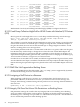
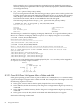

# hpvmstatus -P aviotest
[Storage Interface Details]
Guest Physical
Device Adaptor Bus Dev Ftn Tgt Lun Storage Device
======= ========== === === === === === ========= =========================
disk avio_stor 0 2 0 22 0 disk /dev/rdsk/c82t15d3
The following statistics are displayed in this example:
• PciBus = 0
• PciDev = 2
• PciFtn = 0
• Addr (Target Id) = 22 (0x16)
• Lun = 0
Note that Addr (Target Id) is decimal in the hpvmstatus display, and PciFtn and Lun are always
zero (0).
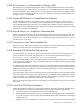
The Integrity VM guest EFI device path encodes PciBus, PciDev, and Addr (Target Id) from the
hpvmstatus display:
PciDev
|
| PCIFtn
PciBus | | Addr(Target Id)
| | | |
V V V V
blk16 : Acpi(PNP0A03,0)/Pci(2|0)/Scsi(Pun16,Lun0)
PciFtn (PCI function) and Lun# are always zero (0). Addr (Target Id) becomes EFI Pun# and is
displayed as a hexidecimal number.
The two methods for mapping an Integrity VM HP-UX 11i v2 guest hardware path or HP-UX
11i v2 Device Special File (DSF) to an Integrity VM Host hpvmstatus display:
1. -e option of the ioscan utility
ioscan -fne displays the HP-UX hardware path/DSF and the EFI device path for the
device. The HP-UX hardware path encodes the following from the hpvmstatus display:
• PciBus
• PciDev
• Addr (Target Id)
Addr (Target Id) is encoded as an HP-UX tgt ID and an HP-UX lun ID in the HP-UX hardware
path.
HP-UX tgt ID and HP-UX lun ID are calculated from Addr (Target Id) in the hpvmstatus
display using the following equations:
HP-UX tgt ID = Addr(Target Id) % 16
HP-UX lun ID = Addr(Target Id) / 16
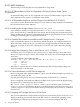
Note the following example:
# ioscan -fne
PciDev
| PCIFtn
| |(Addr(Target Id) % 16) <-> HP-UX tgt ID
PciBus | | |(Addr(Target Id) / 16) <-> HP-UX lun ID
| | | | |
V V V V V
disk 49 0/0/2/0.6.1 sdisk CLAIMED DEVICE HP Virtual Disk
/dev/dsk/c0t6d1 /dev/rdsk/c0t6d1
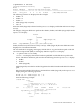
Acpi(PNP0A03,0)/Pci(2|0)/Scsi(Pun16,Lun0)
^ ^ ^ ^
| | | |
PciBus | PCIFtn Addr(Target Id)
|
PciDev
8.2 Known Issues and Information 85