
User guide



102
VTB USER GUIDE
Scope
Enable the digital scope (see relative section)
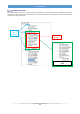
DEBUG.NET options
It allows to set some DEBUG options.
Block Read Delay (Ms)
If this option is greater than ZERO a delay is added after the read of a block. If DEBUG uses the serial
port RS232 IT ISN'T NECESSARY.
It can be useful in ETHERNET because the high speed of the protocol could create some problem to
the VTB application (slowdowns).
We recommend to set the delay, when using ETHERNET to debug the application, with a value of at
least one Ms.
HEXADECIMAL/DECIMAL display
If activated the numeric value of the variables will be displayed in HEXADECIMAL format.
ASCII display
If activated, the ASCII character corresponding to the value of the variable will be displayed (it is useful for array of
alphanumeric STRINGS).
It shows the elapsed time (in Milliseconds) of the TASK PLC and the relative percentage of CPU using. If the system read
a value near the CRITICAL one it will be signal by RED BLINKS af the value.
Run after BreakPoint (or F5 key)
When a Break-Point is reached, it allow to resume the normal running of the program.
Execute Intruction/Routine (or F10 key)
When a Break-Point is reached, with this button it is possible to execute a single line of source code.
Eventual functions will be execute completely without enter inside them.
Execute Intruction (or F11 key)
When a Break-Point is reached, with this button it is possible to execute a single line of source code.
If a function is encountered, program will stop inside it.
Find text
Find a text in the source code windows.