
User Manual
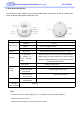
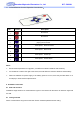
Table Of Contents
- 5.Infrared Remote Control Operation introduction:
- 7.FAQ :
- The device is powered, but why there is no sound w
- Answer:Please make sure the volume level is not mu
- Why I can NOT record voice or I can NOT hear the r
- Answer:Please kindly check if you have adjust the
- Why the device playing even no body around ?
- Answer:Please check if the battery is low power.
- Why the remote control does not work ?
- Answer:The remote will only work when playing soun

Shenzhen Waytronic Electronics Co., Ltd. WT - 50200A
4. Operation introduction
This product is easy to operate ,there are Micro USB ,Button A and Button B, also a 3 Gear switch
which for ON/Off ,Music Mode and Record mode .
Operation
Functions
3 Gear Switch
Left side
Turn off
Middle
Turn on and Music mode
Right side
Record Mode
Button A
Short press
Volume control(From level 0 to level 7),”0” is mute
Button B
Hold this button
3 seconds to
enter Record
Mode
Hold this button 3 seconds to enter Record Mode (the
indicator light is on when entered ),if you want to end the
record,just release this button,then short press the button
for listen the record sound .
Short press
Change to next sound
Indicator
Light
Light on
Enter to record mode or Play sound
Receive the signal
from remote
Indicator light will blink once
Remote control
turn off mode
Light on for 6 seconds
Micro USB port
Connect with
DC5V adaptor
Supply Power to device
Infrared
Induction Range
≤4 Meters
Note:
1.The Micro port is for power supply only, can not change sound file via Micro USB port .
2.Power lost memory function.
3.Remote control do not work when entered record mode;