
User Manual




MicroSound V22
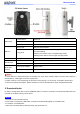
Slide switch
To the bottom
Switch off
To the middle
Switch on, small volume
To the top
Max volume
Button A
Short press
Play the previous audio
Long press
Press and hold the A button to set play mode, not release button
until LED flashing.
Flashing once means: set it to sequential play mode.
Flashing twice means: set it to single cycle play mode.
Button B
Short press
Play the next audio
Indicator light
Light on
Light on means audio playing
Light off
Light off means power off or no audio play
Micro USB
interface
Insert power adapter
Supply power
Connected to computer
To delete or download audio files from computer.
★
Note:
1. When switch on, please wait about 10 seconds, then it can work normally. Within 4 meters, when people or
animal pass by, it will trigger the sensor to play voice.
2. Button function is only used during the process of voice playing. If no voice play, it’s invalid to press button.
3. Before use USB power adapter, please remember to remove the batteries to avoid unexpected accidents.
5. Download Audio
It’s easy to change audio files. Just use USB data cable to connect to computer. Then download audio files from
computer to the Flash memory of this device.
4 Steps:
1. Convert the voice into MP3 format.
2. Connected to computer by USB cable. Computer will automatically appear a “removable disk”.
3. Format the “removable disk”.
4. Open this removable disk by double-clicking, copy audio files to it.