
Use and Care Manual

8 9
KNOW YOUR IMPACT WRENCH
UNPACKING
Carefully remove the impact wrench from the packaging. Make sure to take out all contents and accessories. Do not
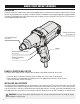
discard the packaging until everything is removed. Check all components and compare against the diagram below.
If any part is damaged or missing, please contact our customer service at (800) 232-1195, M-F 8-5 CST or email us
at techsupport@wenproducts.com.
POWER & DIRECTIONAL SWITCH
The switch of the impact wrench controls both the power and rotational direction of the anvil.
• To run the tool in a clockwise direction, press the lower part of the switch (F for forward).
• To run the tool in a counterclockwise direction, press the upper part of the switch (R for reverse).
• To turn OFF the tool, release the switch.
INSTALLING AN ACCESSORY
The impact wrench is equipped with a quick-connect 1/2-inch hog-ring anvil. To install an accessory, first turn OFF
and unplug the tool. Remove the plastic cover and slide the accessory over the anvil until it is secure. Always make
sure the accessory is securely installed before starting the impact wrench. Use only accessories intended to be used
with hog-ring anvils. Accessories that can only be used with detent-pin anvils are NOT suitable for use with this tool.
1/2" Hog-Ring Anvil
(with cover)
Counterclockwise Rotation
(R = Reverse)
Clockwise Rotation
(F = Forward)
Carbon Brush Cover
(Left & Right Side)
Handle
WARNING: Only use accessories rated for impact use. Use of accessories that are not rated for impact
use could pose a safety hazard.