
Operation Manual

Additional routines
10.2010 FB 7100 67
Filling / Clean
Counters
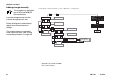
Cash action
--MENU SELECTION---
*Test
Operator
^ v Sel ESC
End
Sel
Esc
Cash collected
Sel
Esc
OK
Esc
v
^
Press < OK> if
cash was collected
Cash audit is
now adjusted
Esc
Esc
Esc
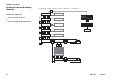
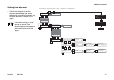
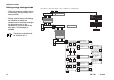
Select “Menu” -> “Enter Password” -> “Test” -> “Operator” -> “Filling/Clean”
Esc
FB 7100
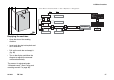
Emptying the cash box
• Open the door of the vending
machine.
• Insert cash box key into keyhole and
turn it clockwise.
• Pull out the cash box and empty it.
(fig. 58)
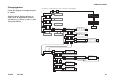
• Turn to the display and follow the
diagram to register the removed
amount electronically.
The amount is registered under
“Collected money” (See “Calling and
resetting counters” on page 56).
58