
Operation Manual

Additional routines
68 FB 7100 10.2010
Filling / Clean
Counters
Cash action
--MENU SELECTION---
*Test
Operator
^ v Sel ESC
End
Sel
Esc
Dispense coins
Manual filling
*
Cash collected
Sel
Esc
Esc
v
^
v ^
v
^
v
^
Press < OK> to
adjust audit
Esc
Esc
Esc
Esc
Esc
OK
Cash audit is
now adjusted
Esc
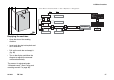
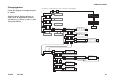
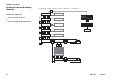
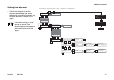
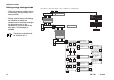
Select “Menu” -> “Enter Password” -> “Test” -> “Operator” -> “Filling/Clean”
FB 7100
* Applicable only to BDV and MDB/
ICP coin mechanisms.
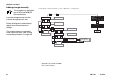
Adding change manually
This procedure is applicable
only to BDV and MDB/ICP
coin mechanisms.
Insert the change amount into the
machine through the coin slot.
Follow the diagram to electronically
register the inserted amount as
change.
The inserted amount is registered
under “Manually filled” (See “Calling
and resetting counters” on page 56)