
Operation Manual

Additional routines
10.2010 FB 7100 69
Change prices
--MENU SELECTION---
*Test
Operator
^ v Sel ESC
End
Filling/Clean
Basic operations
Sel
Esc
Price per drink
Price per cup
Sel
Esc
Select drink
Sel
Esc
Sel
Esc
Sel
Sel
Esc
Esc
OK
v ^
Counters
v ^
Cash action
v ^
v ^
Global price
v ^
Price On/Off
Sel
Esc
Sel
Esc
v ^
Esc
Esc
Esc
Step prices
Set step price(s)
v ^
Esc
Esc
Esc
Esc
Price: Coffee black
Value: 0000.00
(-) (+) -> OK
OK
Price per cup
Set value: 0000.00
(-) (+) -> OK
Sel
OK
Price per cup
Set value: 0000.00
(+) -> Esc OK
Sel OK
Set step price
Value : 00.00
(-) (+) -> OK
Sel OK
Step price(s)
(Off = 0, On = 1) : 0
(-) (+) Esc OK
Select drink
v ^
Esc
Global stepprice(+)
Sel OK
Global price (+)
Set value : 00.00
(-) (+) -> OK
v ^
Esc
Global stepprice(-)
Sel OK
Global price (-)
Set value : 00.00
(-) (+) -> OK
Preselection 1(+)
Preselection 1(-)
Select “Menu” -> “Enter Password” -> “Test” -> “Operator” -> “Filling/Clean”
Esc
FB 7100
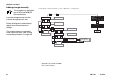
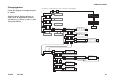
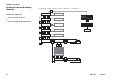
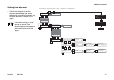
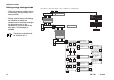
Changing prices
Follow this diagram to change the price
of a drink.
See the section Settings buttons on
page 10 for an explanation of how to
use the Plus (+), Minus (-), Next (->) and
Save (OK) buttons.