
User's Manual

WSP-i450 Rev. 6.2
http://www.woosim.com
6
CONTENTS
1. Outline. .................................................................................................................................. 8
1.1. Model classifications. .................................................................................................. 8
1.2 Symbol........................................................................................................................... 8
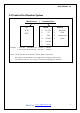
1.3 Product Part Number System ..................................................................................... 9
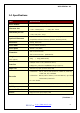
1.4. Specifications. ............................................................................................................ 10
2. Setting up the printer. ...................................................................................................... 12
2.1. Printer & Accessories ................................................................................................ 12
2.2. Printer Features ......................................................................................................... 13
2.3. Dimensions................................................................................................................. 14
2.4. Replacing paper roll. ................................................................................................. 16
2.5. Power supply ............................................................................................................. 17
2.5.1. Specified power supply .................................................................................. 17
2.5.2. Installing the SAM Card and the battery ..................................................... 17
2.5.3. Recharging the battery pack ......................................................................... 18
2.6. Set operation mode .................................................................................................. 19
2.6.1. GAP/HOLE SENSOR SETTING ........................................................................ 21
2.7. Confirmation of the Wireless-LAN information ..................................................... 24
2.7.1. MAC Address printing .................................................................................... 24
2.7.2. Confirmation of the Wireless-LAN setting information ............................. 24
3. Interface ............................................................................................................................... 25
3.1. UART ........................................................................................................................... 25
3.2. Bluetooth .................................................................................................................... 26
3.3. Wireless LAN .............................................................................................................. 26
3.4. Card Reading & Smart Card insert ......................................................................... 26
4. Smart Card Module ........................................................................................................... 27
4.1. General Spec. ............................................................................................................. 27
4.2. Communication Protocol Sequence ........................................................................ 28
4.2.1. Regular Operation .......................................................................................... 28
4.2.2. Irregular Operation (Communication Error) ................................................. 28