
User's Manual

WSP-R241 Rev. 1.0
http://www.woosim.com
6
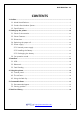
CONTENTS
1. Outline...........................................................................................................................................7
1.1. Model classifications ..........................................................................................................7
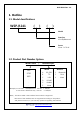
1.2. Product Part Number System ...........................................................................................7
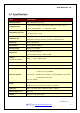
1.3. Specifications. ......................................................................................................................8
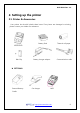
2. Setting up the printer ............................................................................................................. 10
2.1. Printer & Accessories ....................................................................................................... 10
2.2. Printer Features ................................................................................................................. 11
2.3. Dimensions ........................................................................................................................ 12
2.4. Replacing the paper roll .................................................................................................. 14
2.5. Power supply ..................................................................................................................... 15
2.5.1. Internal power supply............................................................................................. 15
2.5.2. Installing the Battery .............................................................................................. 15
2.5.3. Recharging the battery .......................................................................................... 16
2.6. Set operation mode ......................................................................................................... 17
3. Interface ...................................................................................................................................... 22
3.1. USB ...................................................................................................................................... 22
3.2. Bluetooth ............................................................................................................................ 23
3.3. Card Reading ..................................................................................................................... 23
4. Using the printer ...................................................................................................................... 24
4.1. Control panel ..................................................................................................................... 24
4.2. The self test ....................................................................................................................... 25
4.3. Using the Belt clip ............................................................................................................ 26
5. Consumable Parts .................................................................................................................... 27
5.1. Recommended paper....................................................................................................... 27
5.2. Printing position ............................................................................................................... 27
6. Revision History ....................................................................................................................... 28