
User manual


2
USING CHIP™
When you first turn on CHiP™, CHiP™ will look surprised and stretch his legs.
POWERING CHiP™
TURNING ON CHIP™ LOW BATTERY INDICATORS
To get started with CHiP™, first turn him on by pushing the power
switch located on his chest, to On.
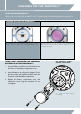
When the batteries grow weak, CHiP™'s eyes will turn PURPLE and
will move very slowly and will make a low battery indication sound.
You can also see current battery levels via the CHiP™ App.
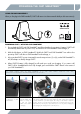
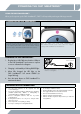
There are 2 ways to recharge CHiP™, either by direct charging or by
using the CHiP SmartBed™.
POWERING CHIP™ - DIRECT CHARGING
Follow the diagram as shown for direct charging.
The CHiP™ product is operated by 1 x 7.4V 1800 mAh
Lithium-ion rechargeable.
ON OFF
NOTE: Do not remove/replace CHiP™ Rechargeable
Battery without first contacting WowWee
®
support (www.wowweezone.com).
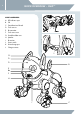
CHIP™ BATTERY DIAGRAM/INSTALLATION
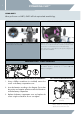
INSTALLING OR CHANGING BATTERIES IN THE CHIP™:
1. Using a Phillips screwdriver (not included) remove the
screws on the battery compartment cover.
2. Insert the batteries according to the diagram. Ensure that
the positive and negative polarities match the illustrations
inside the battery compartment.
3. Replace the battery compartment cover and replace the
screws using the screwdriver. Do not over-tighten.
Rechargeable Battery
(included)