
Manual


User Permissions Xerox 490/980 Color Continuous Feed Printing System
4-4 Printer & PC GUI Guide
Modifying users
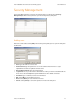
You can modify the entry of a registered user. Select a user to modify and select [Modify] to
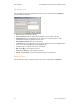
open the following dialog box.
• User: Shows the user name to modify.
• Current Password: Type the password that has been set on the user to modify.
• New Password: Type a new password to set on the user to modify with one to eight
alphanumeric characters. Symbols cannot be used.
• Retype New Password: Verify the new password.
• Logon level: Set a logon level on the user to modify. The logon level is selectable from the
three choices: End User/Operator/System Administrator.
• Comment: Type a comment, such as user information.
• OK: Select [OK] to set information entered.
• Reset: Select [Reset] to reset information entered.
• Cancel: Select [Cancel] to cancel the operation and close the dialog box.
Deleting Users
You can delete the entry of a registered user. Select a user to delete and select [Delete].