
Continuous Feed Duplex Printe Operator Guide

PRINTING TEST OVERLAYS PROBLEM SOLVING
Page 9-16 Xerox 495 Continuous Feed Duplex Printer Operator Guide
Printing test overlays
Note: Test patterns do not print when forced two-up has been set by
software.
To print a test overlay:
1. Stop the current job.
2. At the Production tab, press the Online button to switch the system
to the offline state (Online is not illuminated).
3. Select the Test attachment and press the Online button to enable it.
4. Make sure that the line is in a Not Ready State.
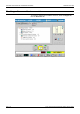
5. Select the Tools tab, then the Test tab.
The Test screen is used for printing different overlays. This will be
used mainly by Support personnel for analysis of print quality.
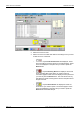
6. Choose a test pattern.
7. Press the Start button to print the test pattern.
8. Press the button to stop printing the test pattern.
9. Press to drain the test.
10. At the Production tab, press the Online button to disable the test
attachment.
11. Choose another attachment and press the Online button to enable
it.