
Continuous Feed Duplex Printe Operator Guide


RUNNING PRODUCTION JOBS RUNNING JOBS
Xerox 495 Continuous Feed Duplex Printer Operator Guide Page 4-5
is solely done by the printer and not recognized by the host
computer. Therefore, if a paper jam occurs, a duplicate page
may be printed as the recovery page.
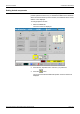
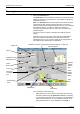
• Line pull-down list - this is used to choose the name of the Line
system previously created under the Definitions > Line tab.
The print line will change to reflect the components of the
chosen line and the status of each of the components.
Note: You must deselect the attachment before you choose a
new line.
• Attachment pull-down list - this is used to choose the name of
an attachment type previously created under the Definitions >
Attachment tab. Once an attachment is enabled, you cannot
change the line.
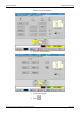
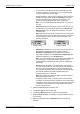
Note: Attachments that use the TCP/IP protocol are shown with
the TCP/IP symbol and those that use the Channel are shown
with the Channel symbol. These symbols are shown in the
following illustration.
• Application pull-down list - this is used to choose the name of
the application definition previously created under the
Definitions > Application tab. Changing the emulation or
paper width checked box in the Definitions > Application tab
displays an asterisk (*) on the Production tab.
Note: You cannot change from an application that is defined for
one-up printing to an application that is defined for two-up
printing without first draining the host system or disabling the
attachment.
• Online indicator and button - this will be green if the printer is
connected to the system or white if the printer is disconnected
from the system. Press the button to switch between the two.
There will be a slight delay when changing the online state while
the controller updates.You need to deselect this before
changing the print line to be used.
Note: By changing from Online to Offline in certain conditions,
the following phenomena occur.
Changing to offline during connecting to host causes that the
connection is reset and host may resend the job from first page.
Changing to offline during print position check mode causes the
cancellation of print position check mode without returning to
original printing position.
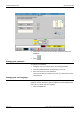
2. Select the Print Line that you want to use.
3. Choose the Job from the pull-down list.
4. Choose the Attachment host and press the Online button.
5. Reset the Page Counter, if necessary. You will be asked to confirm
your decision.
6. Make any adjustments to the Notebook area if necessary and
available.
TCP/IP symbol Channel symbol