
Continuous Feed Duplex Printe Operator Guide

RUNNING PRODUCTION JOBS RUNNING JOBS
Xerox 495 Continuous Feed Duplex Printer Operator Guide Page 4-9
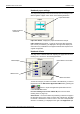
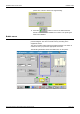
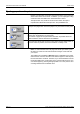
Offset buttons allow you to precisely position on the sheet where the
logical pages (data) will be printed. This is especially useful when using
pre-printed paper.
The left offset button is used to position the logical page on the left side
of the sheet.
The right offset button is used to position the logical page on the right
side of the sheet.
Note: In Definitions, you cannot change from an application that is
defined for one-up printing to an application that is defined for two-up
printing without first draining the host system or disabling the attachment.
Any changes made in the Notebook take immediate effect, without first
having to drain the host system or disable the attachment.
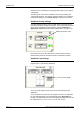
Press to view or amend the back side or to view or amend
the front side.
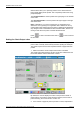
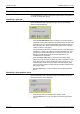
Setting the Check Output value
The Check Output feature allows you to define a number of pages to
print in order to visually check their layout before printing the whole job.
The printer stops as soon as the requested number of pages has been
printed.
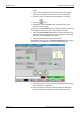
1. Make sure that the Check Output Online button is enabled.
The Check Output Online button and the counter are enabled when the
line is NOT READY and the attachment is online.
By default, the counter displays the value of the previous number of
pages entered, even after a power OFF/ON. However, if there was no
previous setting, the counter is set to a value of 5.
2. If the number of pages to print for preview is correct, skip ahead to