
User's Manual
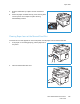



Table Of Contents
- Safety
- Getting Started
- Installation and Setup
- Using the Services
- Printing
- Paper and Media
- Maintenance
- Troubleshooting
- Security
- Specifications
- Regulatory Information
- Recycling and Disposal

Paper Jams
Xerox
®
B205 Multifunction Printer
User Guide
202
3. Remove any paper you see, working slowly so that you
don’t tear any pieces or damage printer parts.
4. After removing the paper you see, pull the baffle up until
the latches click into place.
5. Close the rear cover. Printing will resume automatically.