
Manual

Retrieving Scanned Documents Using Web Browser - 3 of 4
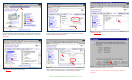
Fig. 1
Enter the IP address of the DC2240/1632 in the address field of Internet
Browser. (You should see a home page like the one above) Then click
Properties.
Fig. 2
Click Mailbox
on the left side of the page.
Fig. 3
Enter the number of the mailbox in which the document was scanned.
Then click the Document List button.
Fig. 4
Place a check mark in the box next to the document to be retrieved and
ext to Enable. Enter Page Number. Click the Retrieve button. n
Fig. 5
Click Save this link
.
Fig. 6
In the File Download window *, click Save.
* This window may vary depending on the operating system of the
computer.