
User Manual

Page 1 of 1
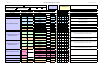
Xerox Recommended Material List (Europe)
Revision 0.0-June 10, 2002
Mode Weight Re-Order # Size MSI
12345
Lightweight
60 gsm
3R91713 A4 S
Plain
80 gsm
3R91720 A4 AAAAM
Plain
80 gsm
3R91820 A4 AAAAM
3R94641 A4 AAAAM
3R94642 A3 AA M
3R94646 A4 AAAAM
3R94647 A3 AA M
3R94656 A4 M
3R94657 A3 M
3R94661 A4 M
3R94662 A3 M
3R11354 A4 M
3R11355 A3 M
3R97154 A4 M
3R97155 A3 M
3R97157 A4 M
3R97158 A3 M
3R97166 A4 M
3R97167 A3 M
3R97172 A4 M
3R97173 A3 M
3R97175 A4 M
3R97176 A3 M
3R93874
8-up
A4
S
3R93875
14-up
A4
S
3R95815
21-up
A4
S
3R93876
30-up
A4
S
3R96177
16-up
A4
S
3R96178
24-up
A4
S
Transparency
Mode
3R97517 A4
S
Heavyweight 2
195 gsm
3R97512 A4 S
Xerox Business
Paper Type Plain should be displayed on the user interface for trays 1, 2,3 & 4. Paper Types are
selected within system settings.
Xerox Digital Colour Colotech+ Gloss
Coated Papers & Covers
Heavyweight 1
Tray 5: 2nd side printing - Use Heavyweight 2 Side 2 mode.
Heavyweight 2
200 gsm
Xerox Digital Colour Colotech+ Silk
Coated Papers & Covers
Tray 5: 2nd side printing - Use Heavyweight 2 Side 2 mode. Enviromental conditions
may require that this product be fed one sheet at a time.
Tray 5: 2nd side printing - Use Heavyweight 1 Side 2 mode. Enviromental conditions
may require that this product be fed one sheet at a time.
Tray 5: 2nd side printing - Use Heavyweight 2 Side 2 mode. Enviromental conditions
may require that this product be fed one sheet at a time.
Tray 5: 2nd side printing - Use Heavyweight 1 Side 2 mode. Enviromental conditions
may require that this product be fed one sheet at a time.
120gsm
Heavyweight 1
Xerox Laser Business Cards
Xerox Colour Copier/Laser Labels
Label Mode
Xerox Digital Color Clear Transparency
Xerox Removable Label
Label Mode
Heavyweight 2
Heavyweight 1
120gsm
Heavyweight 1
Heavyweight 2
170gsm
210gsm
Tray 5: Lightweight (55-63gsm) Plain/Bond/Recycled (64-105gsm) Transparency Label
Heavyweight 1 (106-169gsm) Heavyweight 2 (170-220gsm)
Paper Type Bond should be displayed on the user interface for trays 1,2,3 & 4. Paper Types are
selected within system settings.
Tray 5: 2nd side printing - Use Heavyweight 1 Side 2 mode.
Heavyweight 1
Bond
Trays
90 gsm
Xerox Digital Colour Colotech+
Bond
Trays 1,2,3,& 4: Plain/Bond/Recycled (64-105gsm)
Paper Types are selected within system settings.
Paper Type Plain should be displayed on the user interface for trays 1, 2,3 & 4. Paper Types are
selected within system settings.
A
=Auto Duplex M=Manual Duplex
S=Simplex Only
Additional Information
Media
Xerox Premier
Paper Type Lightweight should be displayed on the user interface for tray 5.
Xerox Premier
160gsm
100 gsm
Paper Type Bond should be displayed on the user interface for trays 1, 2,3 & 4. Paper Types are
selected within system settings.
210gsm
170gsm
DC2240 /1632
Type