
Printer User Guide Phaser 2135





User Guide
31
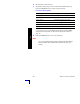
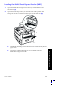
4. The front panel prompts you to select the loaded media type and
size.
a. Press the Value buttons to select a media type:
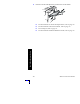
b. See Supported page sizes and print area on page 18.
c. Press the Enter button to save your selection.
Note
To avoid possible print-quality and media-feed problems,
make sure that the loaded media matches the tray type
setting.
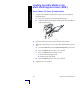
5. Send the job to the printer.
Media Type Options
Media Type Options Weight
Plain paper 75-90 g/m
2
(20-24 lb. bond)
Phaser 2135 Transparency
Heavy paper 90-120 g/m
2
(24-32 lb. bond)
Glossy paper 121-160 g/m
2
(82-108 lb. book)
Thick card stock 163-203 g/m
2
(60-75 lb. cover)
Thin card stock 120-163 g/m
2
(44-60 lb. cover)
Labels
Envelope
Business cards 190 g/m
2
(70 lb. cover)
Light paper 60-75 g/m
2
(16-20 lb. bond)
Multi-Sheet Bypass Feeder