User's Manual
Manuals
Brands
Xerox Manuals
Printers
Xerox Phaser 6700
101
102
103
104
105
106
107
108
109
110
Maintenance
Phaser 6700 C
olor
Printer
101
User Guide
c.
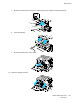
Slide the trans
fer belt int
o the print
er, sto
pping wh
en the visi
ble line r
eaches
the printer
.
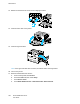
d.
Lower th
e hand
les.
e.
Push the tra
nsfer belt in until
it stops.
12.
Close the imaging unit door.
1
...
...
99
100
101
102
103
...
...
162