User's Manual
Manuals
Brands
Xerox Manuals
Printers
Phaser 7100
101
102
103
104
105
106
107
108
109
110
Troubl
eshoot
ing
104
Phaser 7100 Color
Printer
User G
uide
4.
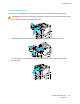
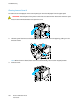
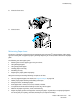
To open Cover E, pull the tab forward and hold it open.
5.
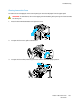
Remove the jammed pape
r.
6.
Relea
se Cover E.
7.
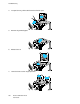
Lower the levers to their original posi
tion
.
1
...
...
102
103
104
105
106
...
...
140