Maintenance
76 Phaser 7100 Color Printer
User Guide
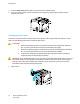
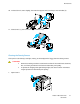
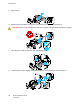
6. Clean the laser lens by wiping the length of its surface three times using the soft end of the cleaning
tool.
7. Replace the imaging unit.
8. Repeat steps 5 through 7 for each color.
9. Replace the cleaning tool.