User's Manual
Manuals
Brands
Xerox Manuals
Printers
Phaser 7100
91
92
93
94
95
96
97
98
99
100
Troubl
eshoot
ing
98
Phaser 7100 Color
Printer
User G
uide
3.
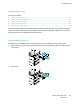
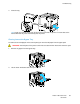
Tilt the tray upward, and pull to remove it.
4.
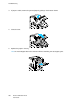
Remove a
ny crumpled pa
per from the tra
y.
5.
Remove a
ny remaini
n
g pieces of pape
r.
6.
Reinsert the tray into the printer.
1
...
...
96
97
98
99
100
...
...
140