User Guide
29
Multi-Purpose Tray
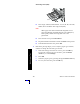
e. Select the paper size by pressing the Up or Down Arrow key.
f. To save your selection, press the OK key.
Note
To avoid possible print-quality and paper-feed problems,
make sure that the loaded paper matches the tray’s paper
type setting.