
User Manual


A
A-10 Color Measurement Instruments
Setting up the DTP32
Before you calibrate the EX7750 using the X-Rite DTP32, you need to connect,
configure, and calibrate the densitometer to prepare for measuring the printed patches
(see “Calibrating the DTP32” on page A-12). For additional information about setting
up and using the DTP32, see the documentation that accompanies the densitometer.
TO CONNECT THE X-RITE DTP32 TO THE COMPUTER
1. Turn off the computer.
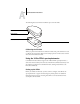
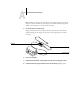
2. Plug the square end of the interface cable (looks like a modular phone plug) into the
I/O port on the side of the X-Rite DTP32.
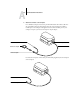
3. Attach the connector to the computer.
For a Windows computer, insert the 8-pin mini-DIN end of the interface cable into
the 9-pin DB9 Connector cable adapter. Insert the 9-pin end into the COM1 or
COM2 port on the computer and tighten the screws. If the available port on your
computer is 25-pin, you must use the 8-pin-to-25-pin adapter.
Square connecto
r
Square connecto
r
Unused connector
Connect to computer
Interface cable
Connect to adapter