
User Manual

Xerox
®
Phaser
®
6022 Color Printer and
Xerox
®
WorkCentre
®
6027 Color Multifunction Printer
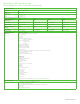
Detailed Specifications 4
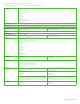
Fax Phaser 6022 WorkCentre 6027
Walk-up Fax
4
Fax Speed NA 33.6 Kbps
Memory 2 MB
Resolution Up to 406 x 392 dpi (Super-High Image Quality)
Up to 203 x 392 dpi (Super Fine)
Up to 203 x 196 dpi (High Quality)
Up to 203 x 98 dpi (Standard)
Compression MH/MR/MMR/JBIG/
1-bit compression
Walk-up Fax Features Auto Redial
Auto Resend
Auto Reduction
One-touch dial (Up to 8)
Address book (Up to 99
address entries)
Group faxing (Up to 6)
Delayed Start
Cover page
Junk Fax Filter
Fax Forward (Forward, Print & Forward, Email, Email and Print, Forward to
Server, Forward to Server and Print)
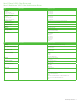
Security
Security Features • Secure HTTPS (SSL/TLS)
• Secure IPP
• SSL
• IP Filtering
• IPv6
• SNMP v3
• IPsec
• WEP(64-/128-bit)
• WPA2-PSK (AES) and WPA/
WPA2-PSK (Mixed Mode)
• Secure HTTPS (SSL/TLS)
• Secure IPP
• SSL
• IP Filtering
• IPv6
• SNMP v3
• IPsec
• WEP(64-/128-bit)
• WPA2-PSK (AES) and WPA/
WPA2-PSK (Mixed Mode)
• Network Address Book Authentication (LDAP, Windows Kerberos)
Wi-Fi Security
• WEP(64-/128-bit)
• WPA2-PSK (AES)
• WPA/WPA2-PSK (Mixed Mode)
Device Management
Xerox
®
CenterWare
®
Internet Services
Device Status Web server embedded
• Tray status/contents
• Consumables status
Print Queue Viewing Visibility of current and completed jobs
Job Submission Print-ready files (PDF, TIFF, JPEG) Print-ready files (PS, PCL
®
5c/6, PDF, TIFF, JPEG)
Device Administration Allows remote installation, setting of configuration options and management of the device
Browsers Users can access the Embedded Web Server of the machine using a generally available web browser.
Xerox
®
Mobile Solutions
Xerox
®
PrintBack PrintBack takes the capabilities of the printer you already use, and extends them beyond your computer and out to your Apple
®
iOS
®
- or Android™-based
mobile device. When you’re working offsite or away from your desk and receive an important document via your mobile device, simply use PrintBack to
print it with your default printer back at your office or desk. Plus, it supports the most common office file types (Microsoft
®
Office documents, PDF, etc.)
with uncompromised print quality.
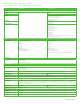
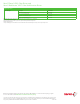
Power Consumption Phaser 6022 WorkCentre 6027
110-127 VAC, 50/60 Hz, 7A or 220-240 VAC, 50/60 Hz, 5A
Continuous Printing (average) 340 watts 330 watts
Standby Mode 45 watts or less
Low Power Mode 10 watts or less
Sleep Mode 3.5 watts or less