
U.M. Android v5.1.1
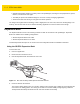

Table Of Contents
- Revision History
- Table of Contents
- About This Guide
- Chapter 1 Getting Started
- Chapter 2 Using the Tablet
- Introduction
- Google Mobile Services
- Home Screen
- Applications
- Suspend Mode
- Rebooting the ET5X
- Chapter 3 Applications
- Chapter 4 Wireless
- Chapter 5 Data Capture
- Chapter 6 Accessories
- Chapter 7 Maintenance and Troubleshooting
- Appendix A Specifications
- Index

5 - 2 ET5X User Guide
•
Omnidirectional (360°) reading of a variety of bar code symbologies, including the most popular linear, postal,
PDF417, and 2D matrix code types.
•
The ability to capture and download images to a host for a variety of imaging applications.
•
Advanced intuitive laser aiming for easy point-and-shoot operation.
The imager uses digital camera technology to take a digital picture of a bar code, stores the resulting image in its
memory, and executes state-of-the-art software decoding algorithms to extract the data from the image.
Expansion Back
The Expansion Backs are bar code scanning solutions for both 1D and 2D bar code symbologies. Expansion
Backs are available in the following configurations:
•
SE4750 Expansion Back for 8” tablet
•
SE4750 Expansion Back for 10” tablet.
Install the Expansion Back prior to use. Refer to the ET5X Integration Guide for installation instructions.
Using the SE4750 Expansion Back
To read a bar code:
1. Launch an application.
2. Ensure that the text field is in focus.
3. Point the Expansion Back exit window at a bar code.
Figure 5-1 Bar Code Scanning with Expansion Back with SE4750
4. Press and hold the Scan button.
The red laser aiming pattern turns on to assist in aiming. Ensure the bar code is within the area formed by the
cross-hairs in the aiming pattern. The aiming dot is used for increased visibility in bright lighting conditions.
The Expansion Back beeps to indicate the bar code was decoded successfully.