
U.M. Android v5.1.1
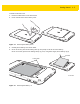
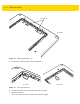
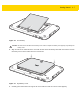
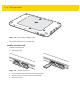
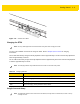
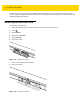
Table Of Contents
- Revision History
- Table of Contents
- About This Guide
- Chapter 1 Getting Started
- Chapter 2 Using the Tablet
- Introduction
- Google Mobile Services
- Home Screen
- Applications
- Suspend Mode
- Rebooting the ET5X
- Chapter 3 Applications
- Chapter 4 Wireless
- Chapter 5 Data Capture
- Chapter 6 Accessories
- Chapter 7 Maintenance and Troubleshooting
- Appendix A Specifications
- Index

Getting Started 1 - 5
To install a micro SIM card:
1. Press the Power button to turn off the ET55.
2. Lift the notched corner of the battery cover.
Figure 1-4 Removing the Battery Cover
3. Carefully lift the battery cover off the ET55.
4. On the 8” version, push the two locking tabs up, then pull up on the tab to remove battery.
On the 10” version, push the two locking tabs up (1), then, using index fingers, lift the battery up (2).
Figure 1-5 Removing the Battery - 8”
Pull Tab
8” Version
Locking Tabs