
User Manual

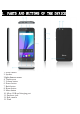

14. Speaker
15. Microphone
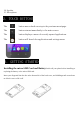
The button moves back one step to the previous menu/page.
The button returns immediately to the main screen.
The button displays a menu of recently opened applications.
The button will launch the applications and settings menu.
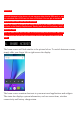
Installing the micro-SIM Card and BatterySwitch off your phone before installing or
replacing the battery or the micro-SIM card.
Insert your fingernail into the slot at the bottom left of the back cover, and slidefingernail across botto
m of back cover to lift it off.
2. TOUCH BUTTONS
3. GETTING STARTED