
User's Manual




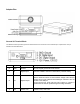

Table Of Contents
- Main Features
- Physical Description
- Installation
- Network Camera Screen and Setup Window
- Viewing the camera from your mobile phone
- Network Camera Setting Interface
- Camera
- Network
- Alarm
- Storage
- Tools
- SPEEDREAD YOUR NETWORK CAMERA
- ADVANCED SETTINGS
- Connected directly to a Computer
- SPECIFICATIONS
- TROUBLESHOOTING
- GLOSSARY OF TERMS

9
Adapter Box
General I/O Terminal Block
This Network Camera provides a general I/O terminal block which is used to connect external input / output devices. The pin
definitions are described below.
Pin No. Pin Name Function Description
4 GND Ground This is a signal ground use for DI and DO
3 DI Digital Iutput Connect to GND to activate or deactivate by software setting
2 DO Digital Output
With a maximum load of 1A and maximum voltage of 60V DV,this
output has an o pen-
collector N PN Darlington t ransistor with t he
emitter to the GND pin.
If use d w ith an ext ernal r elay,a di ode m ust be co nnected in
parallel with the load,for protection against voltage transients.
1 12V Power +12V 12VDC ± 10%, max. 0.4A