
User Manual

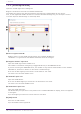

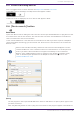
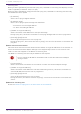
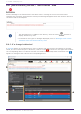
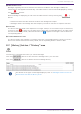
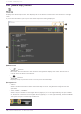
Table Of Contents
- Yamaha LAN Monitor for Win
- Table of contents
- 1. Introduction
- 2. Installing and uninstalling Yamaha LAN Monitor
- 3. Starting and exiting Yamaha LAN Monitor
- 4. Yamaha LAN Monitor screen structure
- 5. Network settings on the computer
- 6. Basic operation
- 7. Menu bar
- 8. Toolbar and display area
- 9. Map screen
- 10. List screen
- 11. Configuring the device
- 12. Update the firmware
- 13. Import/Export the CONFIG
- 14. Resources
- 15. Troubleshooting
-

8.8. [Whole map] button
Displays the whole map screen. This displays all of the devices connected to the network in a single
view.
A print function allows you to print the whole map that is being displayed.
❶ Button area
•
[ ] button
Refreshes the information in the network configuration display area. Click this button to
refresh with the latest information.
•
[ ] button
Displays the print preview screen. You can print the whole map.
❷ Legend area
•
“Date:”
Shows the date and time of when the whole map screen or the [Refresh view] button was
operated.
•
“Port number”, “VLAN ID”
Shows the port number of the higher device (agent) (“2” in the figure below), the port number
of the device connected to the higher device (agent) (“1” in the figure below), and the VLAN ID
that joins the ports connecting the devices.
8. Toolbar and display area
30 | Yamaha LAN Monitor for Win User Guide