
User Manual
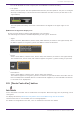
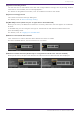
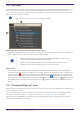
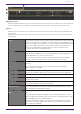
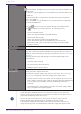
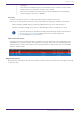
Table Of Contents
- Yamaha LAN Monitor for Win
- Table of contents
- 1. Introduction
- 2. Installing and uninstalling Yamaha LAN Monitor
- 3. Starting and exiting Yamaha LAN Monitor
- 4. Yamaha LAN Monitor screen structure
- 5. Network settings on the computer
- 6. Basic operation
- 7. Menu bar
- 8. Toolbar and display area
- 9. Map screen
- 10. List screen
- 11. Configuring the device
- 12. Update the firmware
- 13. Import/Export the CONFIG
- 14. Resources
- 15. Troubleshooting
-

For the VLAN mode of trunk or hybrid, the set VLAN IDs are listed vertically.
•
Link speed
Shows the link speeds. The link speed between devices (the link speed for the port of the higher
device) is indicated by a colored connection line between the device icons (the lime line in the
figure below).
The link speed indicated by each color is described in the legend at the upper right of the
screen.
❸ Network configuration display area
Shows the information of agents and equipment in the network.
The following information is available depending on the type of the device.
•
Agent
Shows the name, MAC address, device name, and IP address (as shown in the figure below). The
IP address appears as a hyphen (-) when the address cannot be obtained.
•
Device
Shows the IP address, manufacturer, device name, and comment (as shown in the figure below).
The manufacturer, device name, and comment appear as hyphens (-) when nothing is specified.
•
Dante device
Shows the IP address, manufacturer, device name, and comment.
The comment appears as a hyphen (-) when no comment is specified. If Dante Controller has not
been installed, Dante-enabled devices are identified as equipment, so the available information
is the same as for “Equipment.”
8.9. [Dante Controller] button
Starts the Dante Controller that is installed on the computer. Dante settings, such as patching, can be
configured.
To display this button, Dante Discovery/Dante Control and Monitoring must be installed.
If Dante Controller is not installed, an error message appears.
For details on using Dante Controller, refer to the Dante Controller User Guide.
8. Toolbar and display area
Yamaha LAN Monitor for Win User Guide | 31