
User Manual
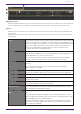
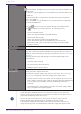
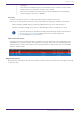
Table Of Contents
- Yamaha LAN Monitor for Win
- Table of contents
- 1. Introduction
- 2. Installing and uninstalling Yamaha LAN Monitor
- 3. Starting and exiting Yamaha LAN Monitor
- 4. Yamaha LAN Monitor screen structure
- 5. Network settings on the computer
- 6. Basic operation
- 7. Menu bar
- 8. Toolbar and display area
- 9. Map screen
- 10. List screen
- 11. Configuring the device
- 12. Update the firmware
- 13. Import/Export the CONFIG
- 14. Resources
- 15. Troubleshooting
-

❷ Port status
This area shows a graphic representation of information concerning the Yamaha switch and Dante-
enabled devices. Use the tabs located below the graphic to switch the information that is shown.
• [Port Status] tab: Shows the connection status and communication speed of each port.
• [Bandwidth(%)] tab: Shows the bandwidth usage of each port. (For switches only)
• [PoE status (Class)] tab: This area shows the power supply status for each port. (For PoE-
enabled switches only)
For more details on the graphic display, refer to “Port icons in the “Device Details”
view”.
The bandwidth usage update interval can be changed in the “Basic Settings” dialog
box, under “Information update interval for selected agent” - “Bandwidth”.
❸ Information for the Dante-enabled device
This area shows information for the Dante-enabled device. To display information for the Dante-
enabled device, Dante Discovery/Dante Control and Monitoring must be installed.
Name Shows the label of the Dante-enabled device.
“Transmit Flows” Shows the transmit flow status.
“Receive Flows” Shows the receive flow status.
“Locked” / “Unlocked”
indicator
Indicates whether the audio signal is locked or unlocked.
Sampling frequency / bit-
length / latency
Shows the sampling frequency, bit-length, and latency of the audio
signal. The latency is shown in μ second units.
“Pull-up/down” Shows the sampling rate pull-up/pull-down setting.
“Mute” indicator Lit in red when the Dante-enabled device is muted.
“Tx” / “Rx”
Shows information about Dante transmission and reception.
[Utilization]: Shows the current amount of transmission and
reception in kbps units.
[Errors]: Shows the number of errors that occurred during
transmission and reception. The [Clear] button located at the right
resets the indication of the [Errors] field to 0.
“Primary” / “Secondary”
Shows the status of the Dante “Primary” port and “Secondary” port.
The link speed is shown inside the graphic of the port.
The setting of the Dante “Secondary” port is shown below the
graphic of the ports.
For more about transmit flow and receive flow, and unicast and multicast, visit the
following Yamaha Pro Audio site, navigate to [Training & Support] → [Self-Training]
→ [Dante Network Design Guide], and refer to [Multicast Settings].
https://asia-latinamerica-mea.yamaha.com/en/products/proaudio/
9. Map screen
34 | Yamaha LAN Monitor for Win User Guide