
User Manual
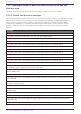
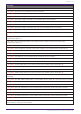
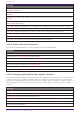
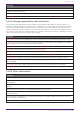
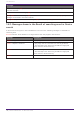
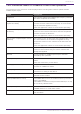
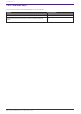

Table Of Contents
- Yamaha LAN Monitor for Win
- Table of contents
- 1. Introduction
- 2. Installing and uninstalling Yamaha LAN Monitor
- 3. Starting and exiting Yamaha LAN Monitor
- 4. Yamaha LAN Monitor screen structure
- 5. Network settings on the computer
- 6. Basic operation
- 7. Menu bar
- 8. Toolbar and display area
- 9. Map screen
- 10. List screen
- 11. Configuring the device
- 12. Update the firmware
- 13. Import/Export the CONFIG
- 14. Resources
- 15. Troubleshooting
-

Messages
Finished creating a snapshot.
Snapshot creation canceled.
Failed to create a snapshot.
[mac] label: There is a port with an incorrect device connected. Connect [mac] label to port n.
14.2.4. Messages generated by the PoE function
The following messages appear when the PoE function detects abnormality in a power supply. mac
indicates the MAC address of the device that is the subject of the message, label indicates the label
identifying the device (does not appear when left blank), q indicates a number that represents the
power, n indicates the port number, portIp indicates the IP address of the device connected to the
port, and portMac indicates the MAC address of the device connected to the port. Messages are not
shown for devices that do not support power supply.
Messages
[mac] label: The power being supplied from the Yamaha switch has exceeded the guard band range.
[mac] label: The power that might be supplied exceeds q W. The power being supplied from Yamaha
switch might be interrupted according to the condition.
[mac] label: Yamaha switch has detected down of portIp (portMac).
[mac] label: Yamaha switch has detected portIp (portMac).
[mac] label: Yamaha switch has stopped supplying power to portIp (portMac).
[mac] label: Yamaha switch has started supplying power to portIp (portMac).
[mac] label: Sum of power might be supplied has exceeded the maximum power supply capacity.
[mac] label: Port (n) of the Yamaha switch stopped supplying power because the maximum power has
been exceeded.
[mac] label: The power supply interruption on port (n) of the Yamaha switch was resolved.
[mac] label: Sum of power might be supplied has fallen below the maximum power supply capacity.
14.2.5. Other notifications
Messages
The snapshot file is invalid. Stopped loading snapshot file.
An invalid value was included in the information of the snapshot file. Only the valid information has
been applied.
There are conflicting MAC addresses. The MAC address information that was listed first has been
applied.
The label settings file is invalid. Stopped loading label settings file.
An invalid value was included in the information of the label settings file. Only the valid information
has been applied.
Conflicting MAC addresses exist in the label settings file. The MAC address information that was
listed first has been applied.
The History file is invalid. Discarded History file.
14. Resources
Yamaha LAN Monitor for Win User Guide | 73