
User Manual
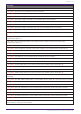
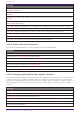
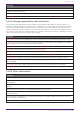
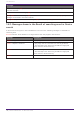
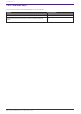

Table Of Contents
- Yamaha LAN Monitor for Win
- Table of contents
- 1. Introduction
- 2. Installing and uninstalling Yamaha LAN Monitor
- 3. Starting and exiting Yamaha LAN Monitor
- 4. Yamaha LAN Monitor screen structure
- 5. Network settings on the computer
- 6. Basic operation
- 7. Menu bar
- 8. Toolbar and display area
- 9. Map screen
- 10. List screen
- 11. Configuring the device
- 12. Update the firmware
- 13. Import/Export the CONFIG
- 14. Resources
- 15. Troubleshooting
-

Messages
The L2MS manager (mac) other than this PC has been detected. Only one L2MS manager can be used in
the same network.
Duplication with L2MS manager (mac) has been resolved.
[mac] label: The L2MS manager (mac) other than this PC has been detected at port(n). Only one L2MS
manager can be used in the same network.
[mac] label: Duplication with L2MS manager (mac) detected at port (n) has been resolved.
14.3. Messages shown in the Result of searching area for Device
search
A device search using one or more IP addresses can return the following messages in the Result of
searching area.
X.X.X.X indicates the IP address of a target device that was pinged or searched for.
Message Description
X.X.X.X : Reply received. A ping reply was returned from the target device.
X.X.X.X : Request timed out.
A ping reply was not returned from the target device.
* This message is not shown for [IP address range] and
[Auto search in local network].
X.X.X.X : Destination unreachable.
The search target does not exist.
* This message is not shown for [IP address range] and
[Auto search in local network].
X.X.X.X : An internal error occurred. An internal error has occurred.
14. Resources
74 | Yamaha LAN Monitor for Win User Guide