
User Manual
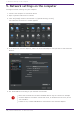
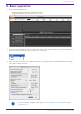

Table Of Contents
- Yamaha LAN Monitor for Mac
- Table of contents
- 1. Introduction
- 2. Installing and uninstalling Yamaha LAN Monitor
- 3. Starting and exiting Yamaha LAN Monitor
- 4. Yamaha LAN Monitor screen structure
- 5. Network settings on the computer
- 6. Basic operation
- 7. Menu bar
- 8. Toolbar and display area
- 9. Map screen
- 10. List screen
- 11. Configuring the device
- 12. Update the firmware
- 13. Import/Export the CONFIG
- 14. Resources
- 15. Troubleshooting
-

6. Basic operation
1. Start Yamaha LAN Monitor.
2. From the network adapter selection pull-down menu in the toolbar, select the network adapter to
which the network that you want to monitor is connected.
3.
Click [Setup] in the menu bar → [Basic Settings] to configure basic Yamaha LAN Monitor settings.
Click [OK] to apply settings.
For more details on [Basic Settings], refer to the [Basic Settings] section under
the “Menu bar”.
6. Basic operation
Yamaha LAN Monitor for Mac User Guide | 15