
User Manual
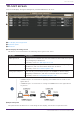
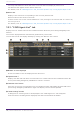
Table Of Contents
- Yamaha LAN Monitor for Mac
- Table of contents
- 1. Introduction
- 2. Installing and uninstalling Yamaha LAN Monitor
- 3. Starting and exiting Yamaha LAN Monitor
- 4. Yamaha LAN Monitor screen structure
- 5. Network settings on the computer
- 6. Basic operation
- 7. Menu bar
- 8. Toolbar and display area
- 9. Map screen
- 10. List screen
- 11. Configuring the device
- 12. Update the firmware
- 13. Import/Export the CONFIG
- 14. Resources
- 15. Troubleshooting
-

10. List screen
This screen displays the agents managed by Yamaha LAN Monitor as a list.
❶ List display switching button
❷ Operation panel
❸ Device list
❶ List display switching button
Tab button to switch between the following three types of list views.
Tab name Descriptions
L2MS Agent List Displays a list of Yamaha switches and Yamaha wireless LAN access points
being managed by LAN Monitor.
For details, refer to “L2MS Agent List” tab.
Firmware Update From this tab, you can update the firmware for devices being managed by
LAN Monitor, and view information about the firmware.
For details, refer to “Firmware Update” tab.
Config Import/Export From this tab, you can import/export the CONFIG for devices being
managed by LAN Monitor, and view information about the CONFIG.
For details, refer to “Config Import/Export” tab.
• “CONFIG import” is a function for applying the CONFIG file on the PC to the
agent device.
• “CONFIG Export” is a function for saving the CONFIG file of the agent device
to your PC.
❷ Operation panel
This panel shows the buttons for controlling the list display, the buttons to operate on the
10. List screen
Yamaha LAN Monitor for Mac User Guide | 39