
User Manual
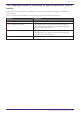

Table Of Contents
- Yamaha LAN Monitor for Mac
- Table of contents
- 1. Introduction
- 2. Installing and uninstalling Yamaha LAN Monitor
- 3. Starting and exiting Yamaha LAN Monitor
- 4. Yamaha LAN Monitor screen structure
- 5. Network settings on the computer
- 6. Basic operation
- 7. Menu bar
- 8. Toolbar and display area
- 9. Map screen
- 10. List screen
- 11. Configuring the device
- 12. Update the firmware
- 13. Import/Export the CONFIG
- 14. Resources
- 15. Troubleshooting
-

14.3. Messages shown in the Result of searching area for Device
search
A device search using one or more IP addresses can return the following messages in the Result of
searching area.
X.X.X.X indicates the IP address of a target device that was pinged or searched for.
Message Description
X.X.X.X : Reply received. A ping reply was returned from the target device.
X.X.X.X : Request timed out.
A ping reply was not returned from the target device.
* This message is not shown for [IP address range] and
[Auto search in local network].
X.X.X.X : Destination unreachable.
The search target does not exist.
* This message is not shown for [IP address range] and
[Auto search in local network].
X.X.X.X : An internal error occurred. An internal error has occurred.
14. Resources
Yamaha LAN Monitor for Mac User Guide | 73